

Youtube FULL TOOL RENDER + CHEAT + COPYRIGHT, DOCUMENTS ALL THE TIME..VV ... YOUTUBE
[size=medium][font=helvetica, arial, sans-serif][size=small][font=helvetica, arial, sans-serif]Currently I have included articles to SHARE FULL TOOL + DOCUMENT + YOUTUBE COURSE for you to follow my
reference
tool[size=small][font=helvetica, arial, sans-serif]here[font=helvetica, arial, sans-serif] MyRenderTools (Freeware).
Download Here[font=helvetica, arial, sans-serif] [/font]
Figure # 1[/font][/font][/size][/font][/size][/font][/size]
[size=undefined][size=undefined][size=undefined][size=undefined]
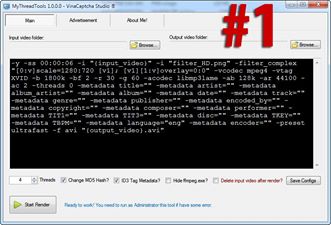
Tool to render video in ffmpeg, so you can study ffmpeg code and drop to tool using.
Tool runs multithreaded, max 20 threads ffmpeg running at the same time.
---
Figure # 2[/size][/size][/size][/size]
[size=undefined][size=undefined][size=undefined][size=undefined]
The tool is freeware, so I have to add the Advertisement tab, to show your ads, hope you open the heart of acceptance and do not block your website advertising, if block block tool will also not work long . Thanks All

---
Image # 4

The directory containing the tool is also the directory that contains the light file, or the filter.png, or the background video. You copy it to the corner folder of the tool and use it as the image code # 4.
---
Figure # 5
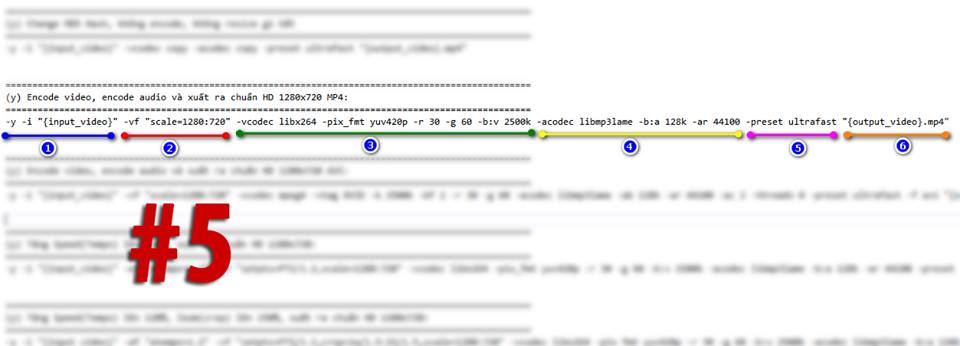 [font=helvetica, arial, sans-serif]A ffmpeg command line can be divided into the following:[/font][font=helvetica, arial, sans-serif]Stage 1: Display the input video, or filter.png. [/font][font=helvetica, arial, sans-serif]Field 2: Code effects such as resize, scale, overlay, boxblur, etc. for input video. [/font][font=helvetica, arial, sans-serif]Part 3: Encode video in MP4, AVI, FLV, etc.[/font][font=helvetica, arial, sans-serif]Part 4: Encode audio in MP3 format[/font][font=helvetica, arial, sans-serif]Part 5: Tell ffmpeg that it needs to render fast, slow, fast, ... as it is polar. fast. [/font][font=helvetica, arial, sans-serif]Box 6: Video output, which means output video and save where. [/font][font=helvetica, arial, sans-serif]---[/font][font=helvetica, arial, sans-serif]Image # 6[/font]
[/size][/size][/size][/size]
[size=undefined][size=undefined][size=undefined][size=undefined]
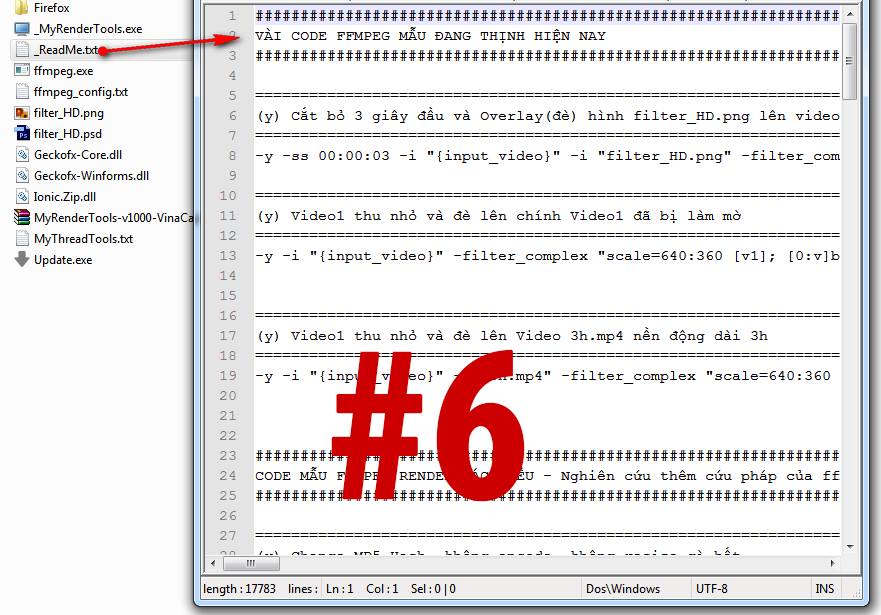
Contains sample ffmpeg code that you have prepared, referring only to the sibling learn how to use ffmpeg code.
---
The situation is just say so much, it will update more features and explanations later.[/size][/size][/size]
[/size]
[size=medium][font=helvetica, arial, sans-serif][size=small][font=helvetica, arial, sans-serif]Currently I have included articles to SHARE FULL TOOL + DOCUMENT + YOUTUBE COURSE for you to follow my
reference
tool[size=small][font=helvetica, arial, sans-serif]here[font=helvetica, arial, sans-serif] MyRenderTools (Freeware).
Download Here[font=helvetica, arial, sans-serif] [/font]
Figure # 1[/font][/font][/size][/font][/size][/font][/size]
Tool to render video in ffmpeg, so you can study ffmpeg code and drop to tool using.
Tool runs multithreaded, max 20 threads ffmpeg running at the same time.
---
Figure # 2[/size][/size][/size][/size]
The tool is freeware, so I have to add the Advertisement tab, to show your ads, hope you open the heart of acceptance and do not block your website advertising, if block block tool will also not work long . Thanks All
---
Image # 4
The directory containing the tool is also the directory that contains the light file, or the filter.png, or the background video. You copy it to the corner folder of the tool and use it as the image code # 4.
---
Figure # 5
[font=helvetica, arial, sans-serif]A ffmpeg command line can be divided into the following:[/font][font=helvetica, arial, sans-serif]Stage 1: Display the input video, or filter.png. [/font][font=helvetica, arial, sans-serif]Field 2: Code effects such as resize, scale, overlay, boxblur, etc. for input video. [/font][font=helvetica, arial, sans-serif]Part 3: Encode video in MP4, AVI, FLV, etc.[/font][font=helvetica, arial, sans-serif]Part 4: Encode audio in MP3 format[/font][font=helvetica, arial, sans-serif]Part 5: Tell ffmpeg that it needs to render fast, slow, fast, ... as it is polar. fast. [/font][font=helvetica, arial, sans-serif]Box 6: Video output, which means output video and save where. [/font][font=helvetica, arial, sans-serif]---[/font][font=helvetica, arial, sans-serif]Image # 6[/font][/size][/size][/size][/size]
Contains sample ffmpeg code that you have prepared, referring only to the sibling learn how to use ffmpeg code.
---
The situation is just say so much, it will update more features and explanations later.[/size][/size][/size]
[/size]
